Properties, units and owners
Every other feature works from this record: who owns what, in which building, and since when.
Properties & units
Every building and every unit with its ownership shares, recorded once and kept current, so the rest of Condomana always works from the same data.
Owners
Who owns which unit, and since when. Ownership changes are dated, so a building knows its current co-owners as well as its former ones.
Invitations
Invite colleagues to manage alongside you, and owners into their portal, with a link that works once and then expires. Invited managers and owners are always free.
Without Condomana, and with it
Ownership shares
The classic way
A spreadsheet copied out of the community’s founding deed years ago, and nobody is quite sure it is still current.
With Condomana
Recorded once per unit and used by every apportionment, so no settlement is split on stale shares.
An owner sells
The classic way
The new address is emailed to whoever keeps the list. The previous owner is still getting post in March.
With Condomana
Ownership is dated, so a building knows its current co-owners and who owned the unit in the year being settled.
Reaching the owners
The classic way
Three address lists in two mailboxes, and the one you export from is the old one.
With Condomana
One record per owner, always current, and the same one the portal, the invitations and the settlement all read.
Bring your portfolio in, take it out again
A clean import from your old system, and a full export whenever you want one, so you can always leave with your data.
Migration import
Bring an existing portfolio in from CSV or Excel: properties, units, owners and ownership shares, tenants, opening balances, historical settlements, distribution keys, planned advance payments, reserves and your contractors. Run it as a dry run first, review the reconciliation, then commit. Re-importing never creates duplicates.
Import from your old software (Beta)
Upload the export of your previous software, or your own spreadsheets, as they are. AI suggests which file holds what and which column goes where, and an owner list or rent roll with the unit and the person on one row is split for you. You check and correct every mapping; only headers and a few masked sample rows reach the AI, and a confirmed mapping is reused without it next time.
Full export, whenever you want
Your data is yours. Export the whole organisation at any time: properties, units, owners, ownership history, tenancies, opening balances, settlements, distribution keys, advance payments, reserves and contractors as CSV, plus every uploaded document and receipt in its original format and a manifest naming exactly what is in the archive. The export re-imports exactly and is never locked behind your subscription.
Leaving, and what you take with you
The exit is written into our terms: § 12 names twelve categories we hand over in structured, machine-readable form, including the resolutions register as CSV and PDF, your documents in their original formats, and the activity log. There is no exit fee, no export fee and no penalty, and anything paid in advance for time after the end comes back pro rata.
Moving a portfolio out of another system?
Get your rollout planFour questions, and the order of work comes back built around your answers.
Without Condomana, and with it
Moving off your old software
The classic way
Retype two hundred units, or pay the outgoing vendor for an export you then have to clean up anyway.
With Condomana
Upload the export or your own spreadsheets; AI maps the columns, you check them. A dry run first, and re-importing never creates duplicates.
Starting mid-year
The classic way
Balances carried across by hand, so the first settlement gets argued about instead of read.
With Condomana
Opening balances come in at cutover, so the first annual settlement stands on real figures from day one.
Getting your data out again
The classic way
The old vendor uses the export as leverage: you pay for it, wait for it, or get it as a PDF.
With Condomana
Export the whole organisation to the same canonical CSV at any time. It re-imports exactly, and your subscription never blocks it.
Condominium bookkeeping, done properly
Cent-exact, apportioned by the keys you set, and immutable once approved.
Economic plan
Budget each cost type for the year and Condomana turns it into every unit’s advance payments. Approve it and the year’s schedule is fixed.
Annual settlement
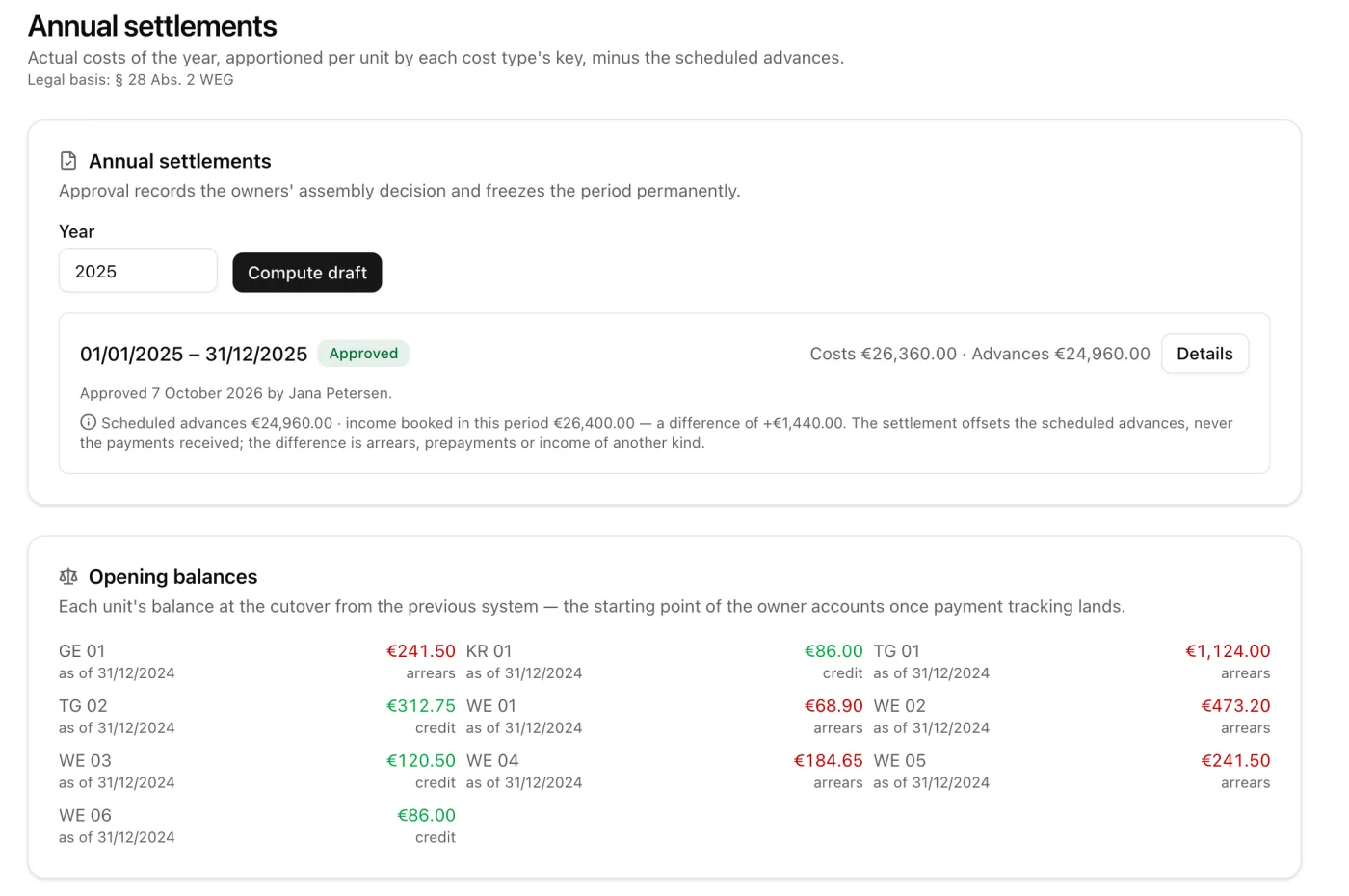
Draft the annual settlement from the year’s bookings, apportioned by each cost type’s distribution key. Approval freezes the settlement and its bookings, so the figures owners receive cannot change afterwards.
Distribution keys & cost types
Apportion by co-ownership share, equally, or by a custom per-unit key. Cent-exact largest-remainder rounding, so every split adds up to the last cent.
Special levies
Raise a special levy, apportion it by any key, and approve it to freeze each owner’s share.
Bookings & opening balances
A booking journal per property, with opening balances carried in at cutover, so a settlement stands on real figures from day one.
Invoice capture
Drop in an invoice and AI reads out the supplier, the invoice number, the amount and the date for you to check. You correct what needs correcting and book it yourself; the AI never books on its own.
Every owner’s own statement
Approving a settlement gives each owner their own statement, in their portal and as a PDF: their share of every cost type, the advances they paid and the balance that follows. Owners see only their own units, and nothing before approval.
Maintenance reserve
Keep the maintenance reserve, and any further reserve, as its own balance. A contribution is a cost type that feeds it and is apportioned to the owners like any other cost; an expense paid out of the reserve lowers it and is never apportioned a second time. Withdrawals can name the resolution that authorised them, and the reserve's development appears in the annual statement and in every owner's portal.
Statement of assets
The statement of assets owners receive after each calendar year; in Germany, the report § 28 (4) WEG requires. It shows the state of every reserve with the movements behind it, computed from the year's bookings and frozen the moment it is drawn up. Approve it and it is filed as a PDF each owner can open. It also states what it does not cover: Condomana has no bank connection, so account balances and unpaid owner contributions come from your accounting.
Tax audit export
Hand a tax auditor the booking journal and voucher index for the period, with cost types, distribution keys, settlements and economic plans, as CSV with the index file and description an audit tool expects. In Germany, this is the GDPdU data handover under § 147 (6) AO.
Receipt review
The advisory board (in Germany, the Verwaltungsbeirat) reviews the year’s expense bookings in the owner portal, each with its receipt beside it, without a visit to your office. Members mark a booking as checked or flag it with a question you answer right on the booking, and close the review with an audit note filed as a PDF. Read-only on the accounting: nothing the board does changes a booking.
Without Condomana, and with it
Economic plan
The classic way
Last year’s Excel, saved under a new name. One dragged formula and every advance payment is wrong for a year.
With Condomana
Budget each cost type and Condomana computes every unit’s advance payments. Approval fixes the year’s schedule.
Annual settlement
The classic way
Two days of tabbing between bank statements, an invoice folder and a workbook nobody else can open.
With Condomana
Drafted from the year’s bookings and apportioned by your keys. Approval freezes the figures owners receive.
Apportioning the costs
The classic way
The last row fudged by a cent or two, so that the column adds up.
With Condomana
By ownership share, equally, or by a custom key, with largest-remainder rounding so every split adds up to the last cent.
Booking an invoice
The classic way
Supplier, invoice number, date and amount typed in by hand. Once per invoice, all year.
With Condomana
AI reads the invoice out for you to check. You correct it and book it; the AI never books on its own.
Special levy
The classic way
A second spreadsheet beside the first one, with its own rounding and its own mistakes.
With Condomana
Raise it, apportion it by any key and approve it. Each owner’s share is then frozen and visible to them.
From the vote to the register
The decision-making of an owners’ association, with a gapless paper trail.
Assemblies & voting
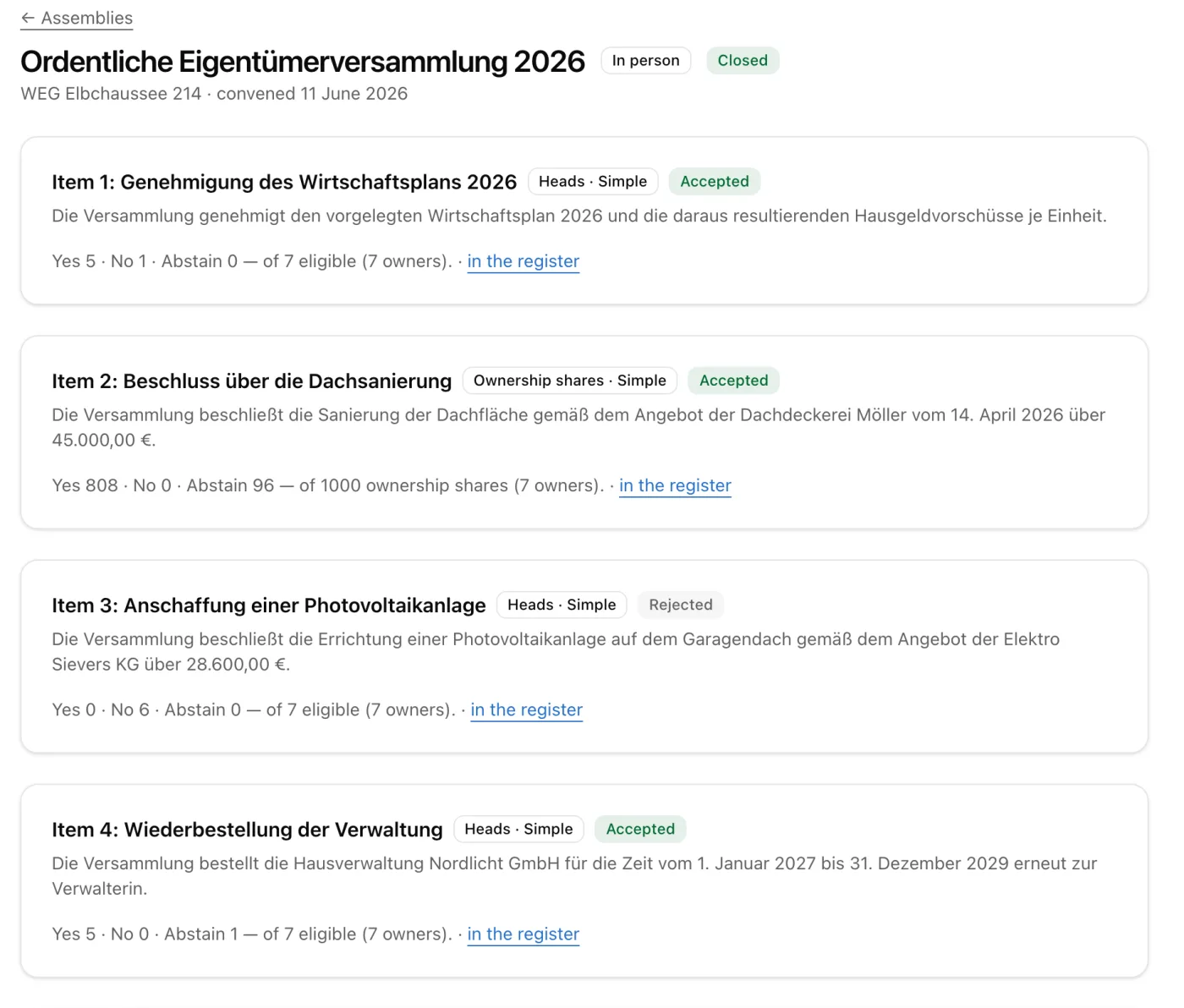
Build the agenda as voting rules, each with a basis (per head or by ownership share) and a majority (simple or unanimous). Record attendance and proxies, cast weighted votes, and closing an item computes the majority for you.
Surveys
Ask the community what it thinks before anything goes to a vote. Single choice, multiple choice or free text, anonymous or named, with a deadline; owners, and tenants if you choose, answer in their portal. The response rate and the results are there at once, and export as CSV. A survey is an opinion poll, not a resolution: nothing it returns binds the community or reaches the register.
Circular resolutions
Decide between meetings. Owners are notified and answer in their portal until the deadline, item by item, with yes, no or abstain. A reply that arrives by email you record yourself. A circular resolution runs through the same engine and lands in the same register as everything else.
Online & hybrid assemblies
In Germany, owners can take part online: in a hybrid assembly once the community has resolved it (§ 23 (1) sentence 2 WEG), or in a fully virtual one under a three-quarter resolution (§ 23 (1a) WEG). They join from the portal, count as present and vote on the item the chair opens, for themselves and for every owner whose proxy they hold, while the tally updates live. Every join, leave and vote goes into the assembly log, attached to the minutes. The video call stays in the tool you already use.
Minutes, and signing them
The minutes are built from what the meeting recorded: who attended and who held a proxy, each item’s legal basis, its majority and its result. Nobody retypes them from a notepad. Send them for signature and the signatories sign in the browser; the signed PDF is hashed, filed against the assembly and shared like any other document.
Resolutions register
A gapless, continuously-numbered resolutions register per property (in Germany, the register § 24 (7) WEG requires). Entries can only be added: challenges, court rulings and corrections are annotated, never overwritten. The register exports for a handover.
Without Condomana, and with it
The owners’ meeting
The classic way
Majorities worked out on paper in the room, and re-argued by email the week after.
With Condomana
Every agenda item carries its basis (per head or by ownership share) and its majority; closing the item computes the result.
Deciding between meetings
The classic way
Signatures collected by post and counted twice, because the first count was disputed.
With Condomana
Owners answer in their portal until the deadline, and the resolution runs through the same voting engine into the same register.
Owners who cannot come
The classic way
A proxy form arrives on the morning of the meeting, or an owner simply misses the vote.
With Condomana
In Germany, they join online from the portal, count as present and vote live on the item the chair opens.
Resolutions register
The classic way
A Word file last updated in 2023, so the statutory record is not there when a buyer asks for it.
With Condomana
Gapless and continuously numbered, append-only: challenges and corrections are annotated, never overwritten.
Every defect, from report to done
The shared list owners can see for themselves, and the upkeep that runs on schedule.
Defect list
Report a defect against a building and move it through open, in progress and handled. A building’s list is communal: every current owner can see it and add a comment.
Recurring maintenance
Schedule recurring upkeep such as the lift, the heating or the fire check, and Condomana raises the ticket each time it is due, so nothing slips.
Inspection rounds
Walk a building with a checklist, either your own or a copy of our building safety walk as a plain starting point, and record each item on your phone as OK, defect or not applicable, with a note and photos. A defect becomes a ticket in one tap, photos included. Finishing the round files a PDF report with the property’s documents, for staff only, the advisory board or all owners, as you choose.
Contractors & sub-tasks
Keep a directory of tradespeople and assign them to a defect, breaking a larger job into sub-tasks you can track to done.
Quotes and jobs by link
Ask several contractors for a quote, or send one the job, straight from the defect. Each gets a personal link and needs no account: they send a price, accept or decline, propose an appointment, report progress with photos and mark the job done. Award one quote and the others are told politely. The contractor sees only your text, the address, the unit and the files you pick; what they send lands on the defect as an internal note, so owners never see the haggling.
Photos & attachments
Attach photos and files to a defect, so both what was wrong and what was done stay on the record.
Follow a defect
Follow any defect to get its updates. Once you unfollow, you stay unfollowed.
A record that holds up
A defect’s timeline only moves forward, so nobody can rewrite when work started and when it was handled, and the record of your duty of care holds up.
Without Condomana, and with it
A defect is reported
The classic way
A phone call, then an email, then “I’ll get back to you”, and the photo arrives three days later.
With Condomana
Owners report it in the portal with a photo, and it lands on the building’s list with a status everyone can see.
“Has anything happened yet?”
The classic way
The same three owners ring every week to ask, and you look it up every week to answer.
With Condomana
A building’s list is communal: every current owner reads the status for themselves and can comment on it.
Getting a tradesperson in
The classic way
Three phone calls for three quotes, the prices in a notebook, and “are you coming on Tuesday?” by text message.
With Condomana
Each contractor gets a personal link and needs no account. Quote, acceptance, a proposed date and progress photos all land on the defect.
Maintenance falling due
The classic way
The lift service is remembered when the invoice arrives, or when the inspection is failed.
With Condomana
Scheduled once, and Condomana raises the ticket every time it comes round, so nothing slips.
Proving your duty of care
The classic way
Reconstructed out of a mailbox on the one day it actually matters.
With Condomana
A timeline that only moves forward (reported, started, handled), so nobody can rewrite the record afterwards.
One current picture, for everyone
Owners look up where a document is and what was announced in their portal, instead of chasing you for it.
Document distribution
File every document against the right building and unit, and share it with exactly the owners entitled to see it. Find any file again by full-text search, and every upload is virus-scanned before anyone can download it.
Announcements
Post a notice for the building you are working in as a digital noticeboard, pin what matters, and reach owners in their portal and by notification. One feed covers every building you manage.
Notifications & digests
Each person chooses how often they hear from Condomana: the moment something happens, or in a daily, weekly or monthly digest. The bell in the app updates live.
Letters by post
Not every owner uses the portal. Each person has a delivery channel (portal, email or post), and one tick on an announcement or a serial distribution reaches everyone: the preview counts who gets it which way, and who cannot be reached. Letters come as one print-ready PDF with the address in the envelope window, or, in Germany, a print-and-post service you connect prints and posts them for you. Every letter shows its status.
Owner portal
A self-service area, separate from the manager app, where owners see their building’s documents, defects and news, comment, answer circular resolutions and vote in assemblies held online, and manage their own profile.
Building logbook
A building’s history on one page: defects and repairs, maintenance, contractor jobs, inspection rounds, assemblies, resolutions and announcements, read live from where they were recorded. Add your own entries for what no other screen knows, like the boiler replaced before you took over. Filter and search it, and export exactly what you see as a PDF for a handover or a sale. Owners read it in their portal, each only what is meant for them.
Room bookings
Residents book the party room, the guest flat or the laundry in their portal, free of charge. You set each room’s rules: who may book, in what steps, how far ahead, the opening hours, and whether a request needs your approval. Double bookings cannot happen, residents see that a time is taken but never by whom, and every confirmed booking arrives by email with a calendar entry.
Without Condomana, and with it
Finding a document
The classic way
Folder stack, USB stick or cloud folder: “where was that again?”
With Condomana
Full-text search across everything, filed against the building and the unit it belongs to.
Getting it to the owners
The classic way
An attachment to a distribution list that is one sale out of date.
With Condomana
Shared with exactly the owners entitled to see it, and virus-scanned before anyone can download it.
Announcing something
The classic way
A printed notice in the hallway that you hope somebody reads.
With Condomana
Post it once and it reaches the portal and the notifications, for one building or every building you manage.
The owner phone calls
The classic way
The same handful of questions, all week, always in the middle of something else.
With Condomana
Documents, defects and news are one login away in the portal, so the questions stop arriving by phone.
For the owner who lets, and their tenant
The rented unit gets a portal too, and an issue climbs the chain when it needs to.
Tenant portal
Tenants sign in to see what their landlord shares and to raise an issue. They have their own login, kept separate from owners.
Tenancy management
An owner who lets records and ends tenancies on their own units and invites their tenant in, without ever touching a co-owner’s unit.
Escalation chain
A tenant issue starts with the landlord. If the landlord endorses it, the same issue moves up to the manager, with nothing retyped and the whole thread intact.
Without Condomana, and with it
A tenant reports something
The classic way
The tenant rings the landlord, the landlord rings you, and the details are retyped twice on the way.
With Condomana
The tenant raises it in their own portal; once the landlord endorses it, the very same issue climbs to you.
An owner who lets
The classic way
Tenancy details live in the owner’s drawer and reach you at the point there is a problem.
With Condomana
The owner records and ends tenancies on their own units and invites the tenant, without touching a co-owner’s unit.
AI that assists, and stays off until you turn it on
Every AI feature is opt-in per organisation, logged, and hosted in the EU. Nothing books or sends on its own.
Document suggestions
For an uploaded document, AI proposes a title, a short summary and metadata, which you accept or dismiss. It files nothing by itself.
Owner assistant
Owners can ask a question and get an answer based only on the documents they are allowed to see. The answer cites its source, and when there is none, it says “I don’t know”.
Rule-based automation
Housekeeping in the background: nudges on stale defects, reminders on unaccepted invitations, and proposals to archive what has long been settled.
Defect triage
When a defect comes in, AI suggests a category, an urgency and possible duplicates, and drafts a first reply, all as chips you accept or dismiss. Nothing changes until you say so.
Drafting
A “draft” button on defect threads and announcements: AI proposes the text in a proper formal tone, you edit and send. Nothing ever goes out on its own.
Digest summaries
Your notification digest opens with a short plain-language summary of what happened, such as defects reported and handled or documents shared. The full list follows below it.
Without Condomana, and with it
Sorting what came in
The classic way
Every new report read, categorised and prioritised by you before any of it is actually work.
With Condomana
AI proposes category, urgency and possible duplicates as chips you accept or dismiss. Nothing changes until you say so.
Writing the reply
The classic way
The same answer written for the fourth time this month, in the proper formal tone.
With Condomana
AI drafts it, you edit and send it. The feature is off until you switch it on, runs in the EU, and never sends anything on its own.
“Which document says that?”
The classic way
You look it up for them, because only you know where it is.
With Condomana
Owners ask and get an answer based only on the documents they may see, with the source cited, or an honest “I don’t know”.
Data protection and records you can rely on
Built for the GDPR and for what European owners expect of their data, with the rules in the system itself.
Signed data-processing agreement
A versioned Art. 28 GDPR DPA, signed in the app at the latest before the upgrade.
Your organisation, isolated
Everything you create lives in your own organisation, walled off from every other, with access inside it controlled by role.
One account, many organisations
Work for several firms with one login and a role in each organisation, and switch between them without signing out.
Data-subject rights, built in
A one-click data export (Art. 15/20) and a controlled erasure that respects statutory retention periods, as the GDPR requires.
Mobile app
Install Condomana on your phone’s home screen and capture a defect even with no signal; it syncs as soon as you are back online. Push notifications are optional and only arrive if you allow them.
EU-hosted, and multilingual
Hosted in the EU. The app and the site come in seven languages (English, German, French, Italian, Spanish, Polish and Portuguese), each with the condominium terms used in that language. The in-app help and the product videos are in English and German.
Without Condomana, and with it
The data-processing agreement
The classic way
A DPA somebody promises to send, and a folder where it ought to be.
With Condomana
A versioned Art. 28 GDPR DPA, signed in the app at the latest before the upgrade.
An owner asks for their data
The classic way
An afternoon of searching mailboxes, inside a one-month statutory deadline.
With Condomana
A one-click Art. 15/20 export, and a governed erasure that respects statutory retention periods.
Who can see what
The classic way
A shared mailbox and a drive folder that everyone in the office can open.
With Condomana
Every organisation walled off from every other, and access inside it controlled by role.
Everything on this page is in the product today. The free trial shows you the same version, so there is nothing to unlearn later.
As at November 2026. The “classic” column above describes how this work is commonly done without software of this kind. It does not compare Condomana with any particular product.